
Ticket types & pricing
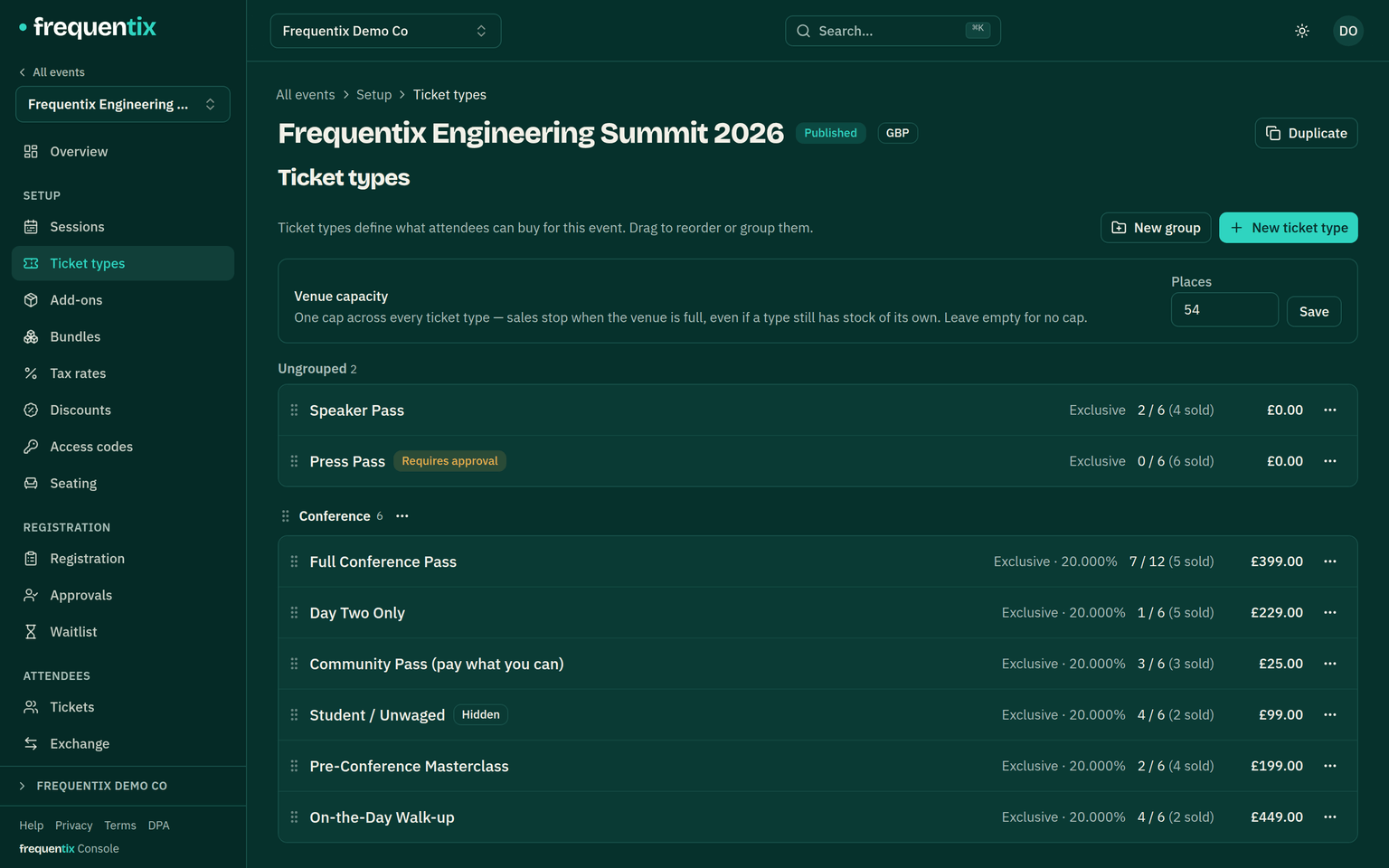
Ticket types are the shape of your event on sale: what it costs, how many exist, who can see it and when it sells. Each event carries as many types as it needs — General, VIP, Student, Early bird.
Where to find it: open your event, then Setup → Ticket types in the sidebar.
What a ticket type carries
- Price — paid or free, with VAT handled per your tax rates.
- Capacity — how many of this type can ever sell. On a seat-mapped type, capacity is derived from the map and can’t be hand-edited. To cap the event as a whole, see venue capacity below.
- Per-order maximum — how many one basket can hold. On a multi-date run this applies per date.
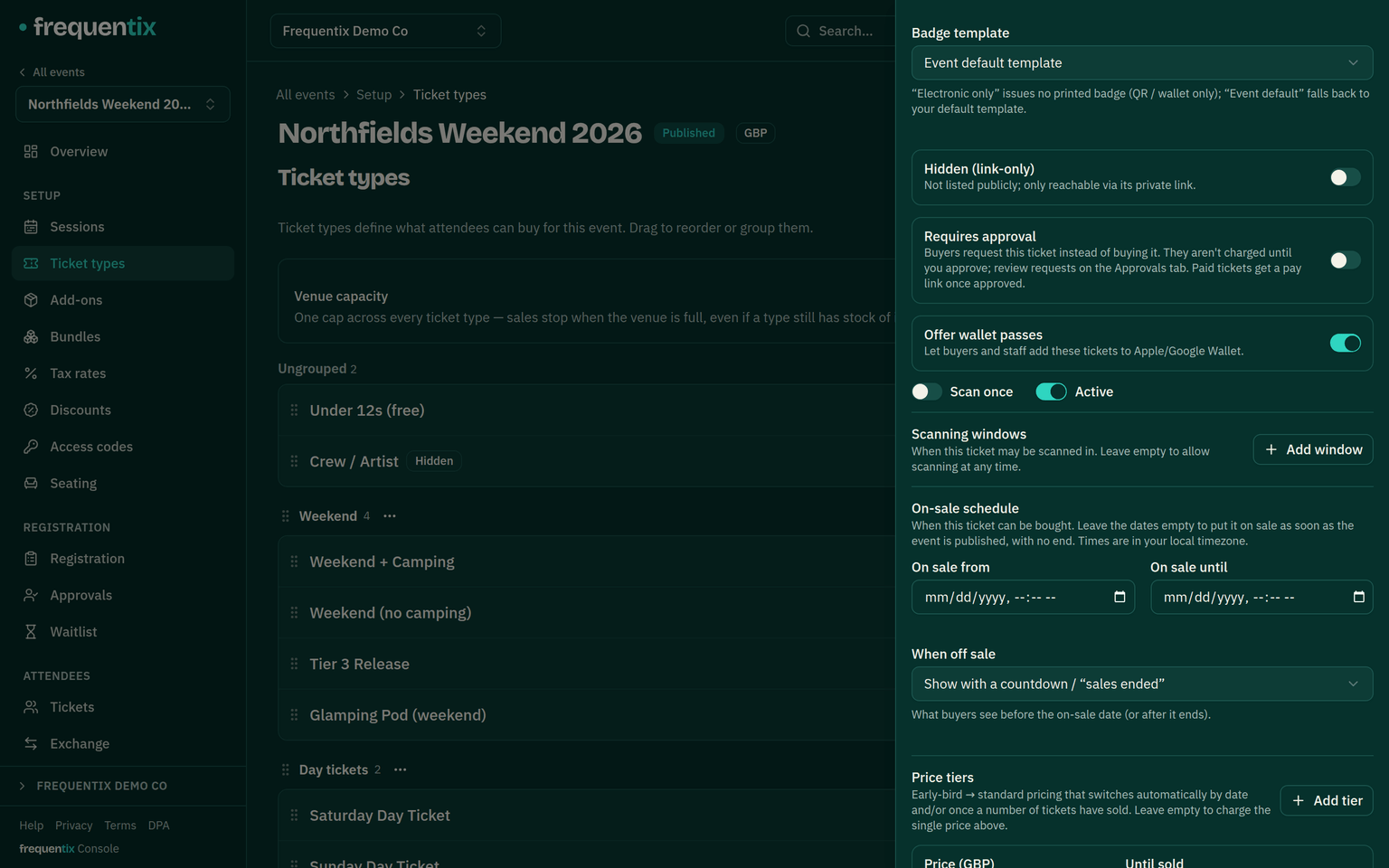
- Sale window — on-sale and off-sale times, applied automatically. A not-yet-on-sale type shows buyers a live countdown in its final hour and flips to purchasable by itself at zero.
- Scan once — on by default: the ticket admits once and a second scan is denied as “already scanned”. Turn it off for a pass that should re-admit all day or all weekend — an in-out wristband, a multi-day conference badge. Devices apply the setting offline exactly as the server does.
- Season ticket (admit once per date) — on a multi-date run, an event-wide scan-once type can instead admit once per date: one ticket, valid on every date of the run — a theatre season, a festival weekend, an annual pass. The door works out which date a scan belongs to from the time of the scan, so nothing about the ticket or its QR changes, and each date’s entries land in that date’s attendance. Buyers see “valid for every date” on the event page. On Starter and above with sessions; only offered on event-wide, scan-once types.
- Scanning windows — optional times outside which this type won’t scan in, whatever the event’s own dates say. A Saturday-only pass on a three-day festival is one window. Leave it empty and the type scans whenever the event is admitting.
- Display groups & order — types and add-ons can be arranged into named, collapsible sections on the event page (“Weekend passes”, “Day tickets”), so a long list reads as a menu rather than a wall. Groups are built separately for ticket types and for add-ons; anything ungrouped shows first, and you drag to reorder both the groups and the items inside them.
- Types can also require approval before purchase, or open a waitlist once sold out.
Capping the whole event
Per-type capacities don’t add up to a room. If early bird, standard and on-the-door each hold 200, you have sold 600 seats in a hall that fits 200. Venue capacity, on the same Ticket types page, caps the event as a whole: types keep their own limits, and the venue figure is the ceiling across all of them. Add-ons never count against it — a programme is not a person.
There are three ways to cap an event and only one applies at a time, which is the thing worth knowing before you go looking for the field:
- A plain event uses venue capacity.
- An event with dated sessions caps per date instead — a run of twelve nights isn’t one pool — so the venue field is unavailable and the console says so.
- A seat-mapped event takes its capacity from the map, which already knows how many chairs exist.
You also can’t set the venue figure below what has already sold or is sitting in someone’s basket — the console refuses and tells you the committed number, rather than quietly overselling.
Hidden & private types
A hidden type doesn’t appear on the storefront until a buyer supplies an access code or arrives by its private link — how guest lists, crew tickets and pre-sales stay off the public page. Access codes are on every plan; see Discounts, access codes & tax rates.
Timed price tiers
A price ladder on one type: Early bird until a date or a sales count, then the next step up, automatically. Buyers see the current price and that it will rise — a deadline that sells without you re-editing the event at midnight.
Pay what you want
Switch a ticket type to “let buyers name the price” and your price becomes a suggestion: the storefront prefills it, and the buyer can pay more or less. Set a smallest acceptable amount, or leave it blank to accept anything — including nothing.
Everywhere there is nobody to ask — a staff sale, the door, an approved request being claimed — the suggested price is charged in full. It can't be combined with timed price tiers, approval or a seat map, because each of those already decides the price another way.
Donations
Separate from ticket pricing, and available on every plan: an event can invite a donation at checkout — your own message, up to four one-tap amounts, and a minimum. Buyers can add a gift to a basket or give without buying a ticket at all. A donation reserves no stock, admits nobody and is outside the scope of VAT.
For a verified charity the platform fee excludes donations entirely, and UK Gift Aid declarations can be collected alongside them.
Per-buyer purchase limits
Where a per-order maximum caps one basket, a purchase limit caps a buyer across orders — four per person means four, even over two visits. Useful against touting and for genuinely limited allocations — as is Exchange face-value resale, which gives would-be sellers a legitimate outlet at exactly the price they paid: the “face value” is the type’s price as actually charged on their order, after any discount, fixed when they list it. The limit holds even when the same buyer checks out twice at the same moment: if the second to finish would breach it, that order is refunded in full automatically — nobody ends up over the limit and charged.