
Orders, tickets & refunds
Every sale is an order: who bought, what they bought, what they paid, every ticket and add-on, and everything that happened since. The order record is where day-to-day support lives.
Where to find it: open your event, then Attendees → Orders, Attendees → Tickets or Attendees → Exchange in the sidebar.
The order record
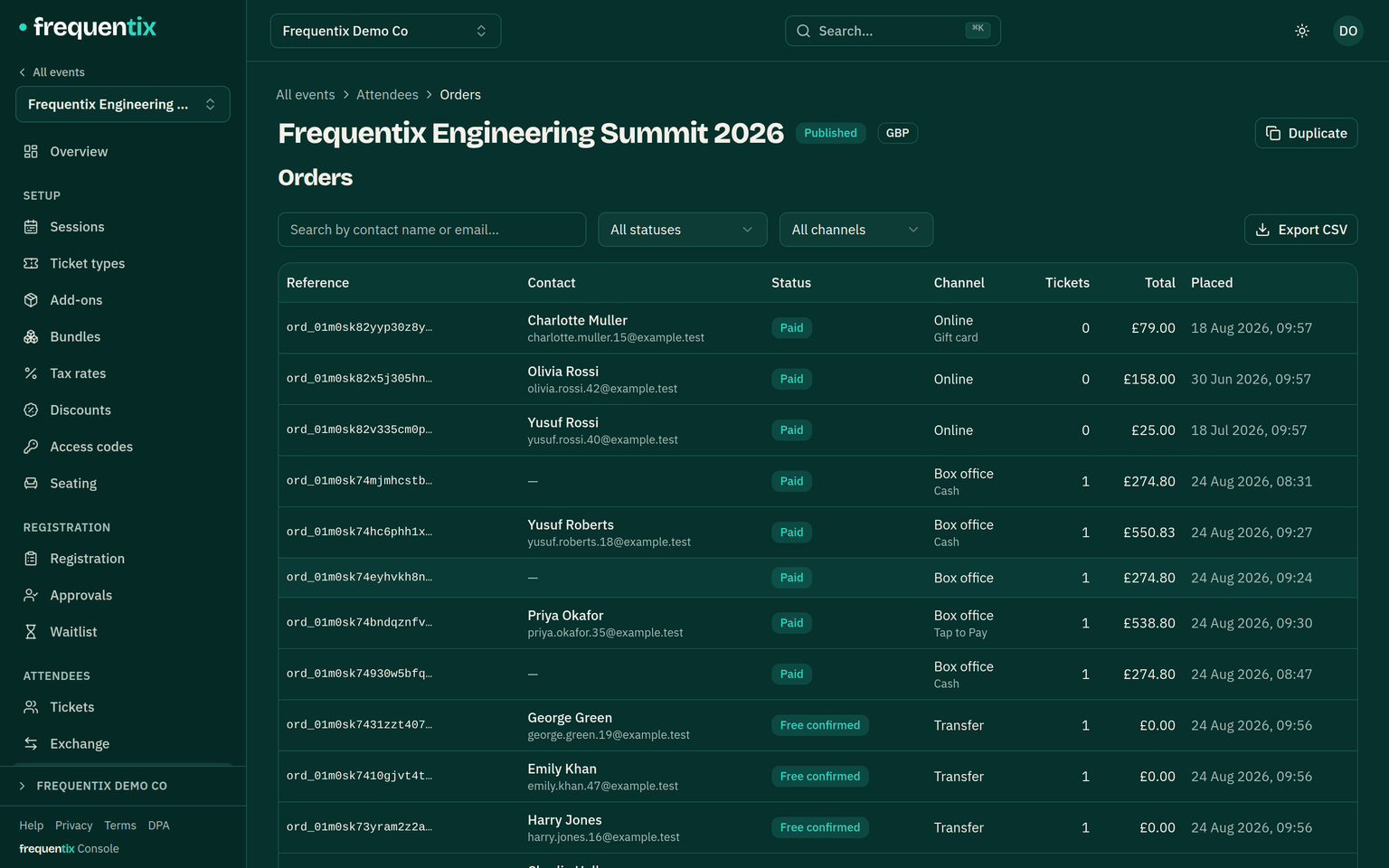
Each event’s Orders list opens into a full order view: line items, payment state, the buyer, registration answers, issued documents, and per-ticket status — valid, checked in, cancelled, refunded. Tickets also appear across events under the event’s Tickets tab and on the contact.
Baskets & holds
A buyer’s basket holds real stock for 15 minutes (topped up when they reach payment, within a half-hour ceiling). Expired holds release themselves — an abandoned basket never needs cleaning up, and “sold out” self-corrects the moment a hold lapses. The same mechanics power door sale drafts in Box Office.
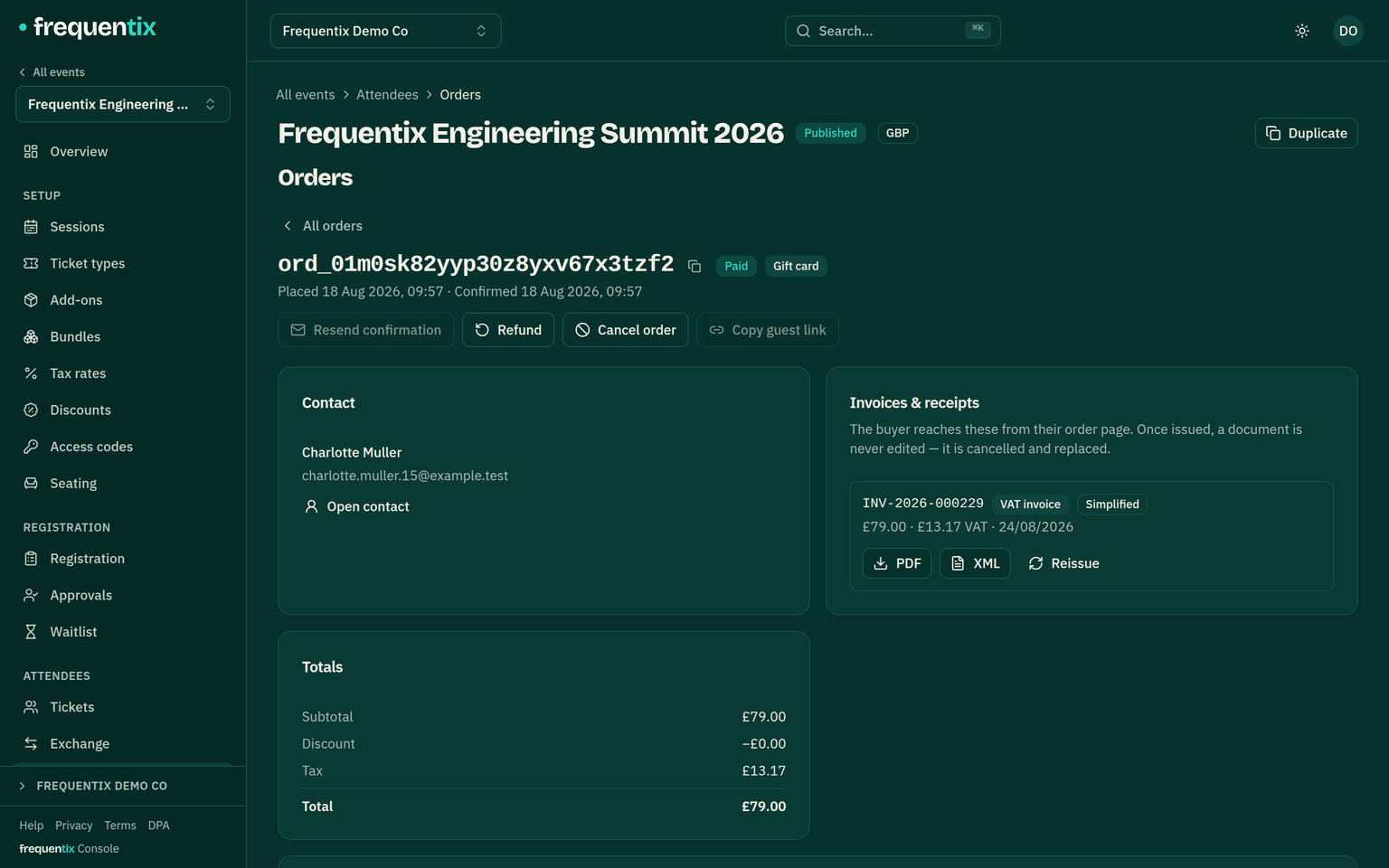
Resending & reassigning tickets
- Resend — email the tickets again to the buyer, for the perennial “can’t find the email”.
- Reassign — hand a ticket to a different attendee. The ticket is re-issued with a fresh QR and emailed to the new person; the old QR stops scanning. Buyers can do this themselves from their order page too.
- Naming attendees is optional at checkout — the “Who’s coming?” step can be skipped and tickets stay under the buyer’s details, so a group purchase is never blocked on knowing everyone’s names yet.
Complimentary tickets
Comp tickets to press, crew, sponsors or anyone else by name: Issue comps on the Orders page asks for the recipient's email, a ticket type and a quantity, and issues the tickets immediately at no charge — whatever the type normally costs. The recipient gets the standard confirmation email with their tickets and order link, exactly as a buyer would.
- Hidden types are comp-able — a hidden “Guest list” ticket type that never appears on your storefront is exactly the kind of type comps are for.
- Comps never touch your sales figures. They appear in the orders list under their own Comp channel and count as attendance at the door, but revenue, order counts and averages ignore them completely.
- Comps use real stock, so a full house stays a full house — raise the ticket type's allocation if you keep a separate comp pool. A recipient who can't make it can decline from their order link, which frees the places again.
- Seat-picked types comp from the box office, where the seat chart is — the console flow covers everything unseated.
Pay by invoice (bank transfer)
A company wants to book a block of passes and pay against an invoice. Draft the order for them as a staff order, then Request bank transfer on the order — the buyer is emailed a payment request with the amount, your bank details (from Settings → Invoicing) and the order reference to quote, and their tickets are held for them while the transfer clears (14 days by default). Seated bookings keep their exact chairs for the whole window.
- When the money lands, open the order and Mark as paid, optionally noting what your bank statement calls the transfer. The order settles like any other payment: tickets issue, the buyer gets their confirmation, and the real invoice or receipt follows automatically. No booking fee is charged on bank transfers — the money never touches Stripe.
- If it never arrives, the order cancels itself when the window lapses: the stock goes back on sale, any waitlist is offered it, and the buyer is told. A transfer that turns up late is yours to return — or draft a fresh order and send a new request.
- The pro-forma is not a VAT invoice — it says so on its face and runs its own numbering series. The buyer can download it (and later the real document) from their order page.
Exchange: transfers & face-value resale
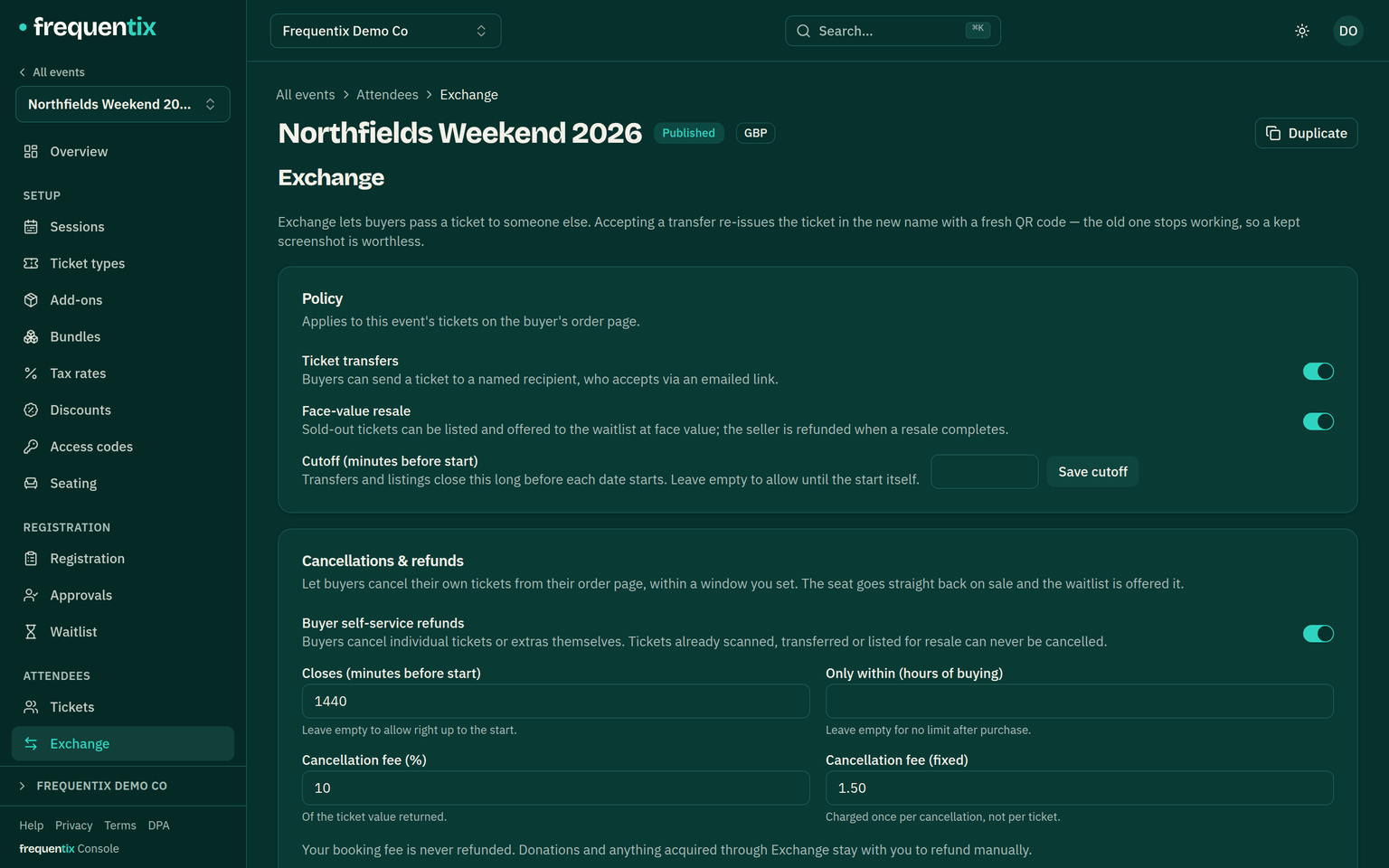
Exchange is frequentix’s set of after-sale flows: buyer-to-buyer ticket transfers, face-value resale and, on a multi-date run, date swaps. Each is a per-event switch on the event’s Exchange page, and each ends in the same safe swap: the old ticket is cancelled and a fresh one is issued — to the new holder, or for the new date — with a new QR code. A kept screenshot of the old code stops working everywhere, offline scanners included.
- Transfers — a buyer sends a ticket to a named recipient from their order page. The recipient gets an emailed claim link (48 hours by default); the ticket keeps admitting for its current holder until they accept. The recipient ends up with their own zero-cost order — wallet passes, reassignment and all. Staff see every offer and swap in the event’s Exchange log and can withdraw a pending offer on the holder’s behalf.
- Face-value resale — a buyer lists a paid ticket for exactly what they paid for it (after any discount, tax included). The listing is offered to the ticket type’s waitlist, first come first served; the new buyer pays the frozen face value plus your normal booking fee, and the seller is automatically refunded the face value to their original card once the sale settles. Booking fees from the original order aren’t refunded, and a listing costs nothing to take down before it sells.
- A transfer or resale never touches your numbers: the sold seat changes hands without going back on sale, revenue and ticket counts stay put, and reporting shows secondary-market activity in its own section.
- Cutoff, eligibility and the exceptions (approval-gated types, checked-in tickets, cash sales for resale) are enforced automatically — buyers only ever see the actions when they would succeed.
Moving a ticket to another date
On a run, a buyer holding one date can move their ticket to another date from their order page — same ticket type, same order, nothing to pay. Switch Date swaps on under Attendees → Exchange; the switch only appears once the event has dates. The move completes on the spot: the old ticket is retired, a fresh one is issued for the new date with a new QR code (wallet passes update by themselves), the place goes back to the date it left and is offered to that date’s waitlist, and the buyer is emailed.
- Your numbers follow the ticket. The order line moves with it, so each date’s sales report shows the ticket and its takings where they now are, the order total never changes, and a later cancellation still refunds the right amount. Any invoice is reissued for the same amount.
- Seated houses. The buyer chooses their seat on the new date as part of the move — the same chair sells separately on every date, so the old seat carries nothing over.
- The Exchange cutoff applies, measured against the date the ticket is leaving — except when that date has been cancelled, when a buyer can move off it however late it is. That is the answer to cancelling a date: holders move themselves, or you move them.
- You can move any ticket yourself from the order page’s Move to another date action, whatever the switch says and whatever the cutoff — a full date still refuses, and a seated ticket is moved by its holder from the storefront, where the seat picker is. Every move, yours or the buyer’s, is listed in the Exchange page’s swap log.
- What can’t move: a ticket that has been scanned in, one mid-transfer or listed for resale, an approval-gated type (approval is given per date), a bundled ticket, anything not sold per date, and a ticket heading for a date where the same order already holds one bought at a different price — a pay-what-you-want ticket, say, or an early-bird beside a full-price one. Two prices on one date would blur what each ticket is worth if it were later cancelled or resold, so the move is refused instead. A ticket received through Exchange can move — no money changes hands — but stays non-refundable.
Refunds & cancellations
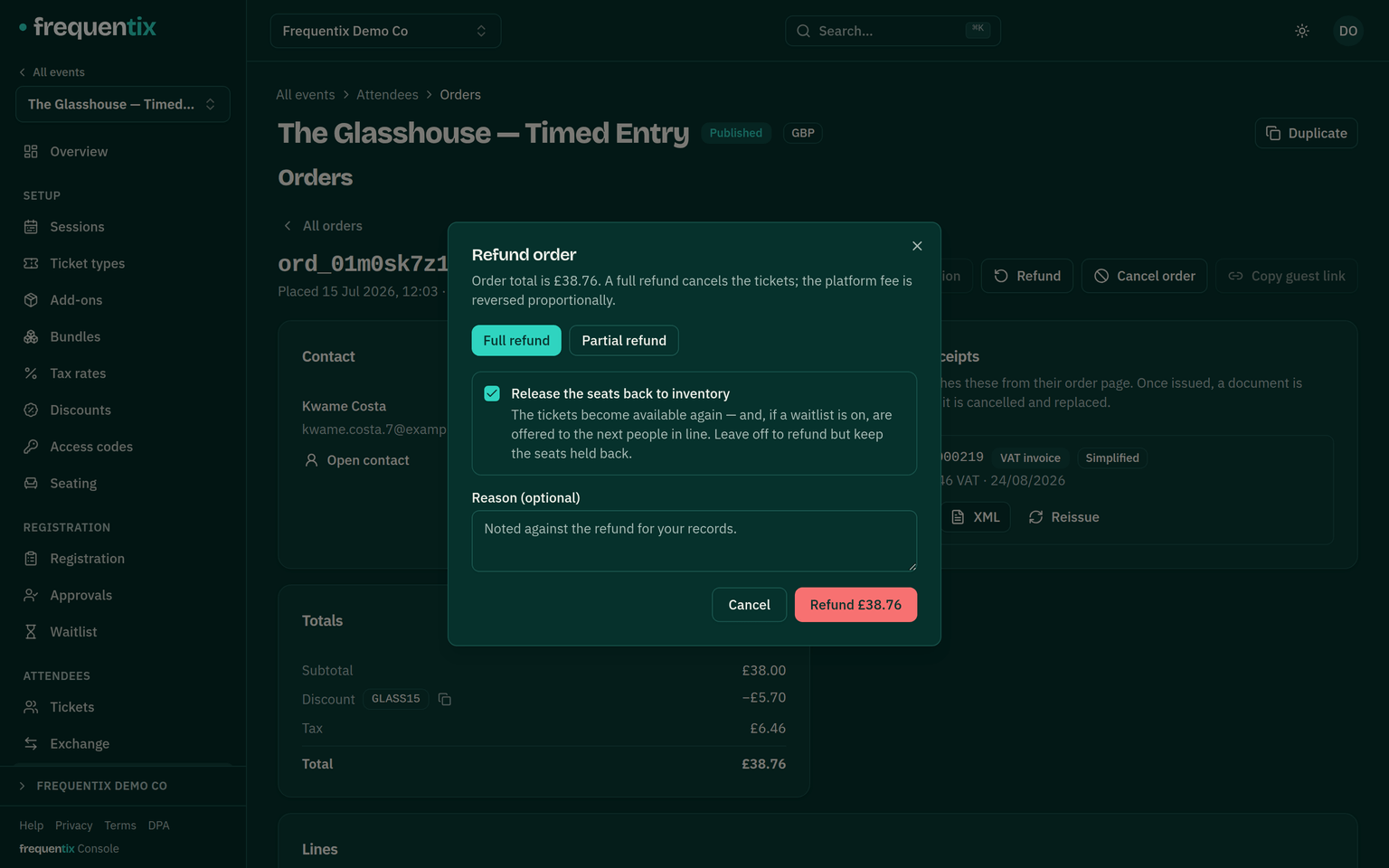
- Refunds — full or partial — are issued from the order and paid back out of your Stripe balance (Getting paid). Refunding is a two-step-verified action.
- A cash order refunds from the same place: the console records the refund — no money moves through Stripe, you hand the cash back yourself — and everything else behaves identically, tickets cancelled and seats released included. The end-of-night cash-up nets recorded refunds out of each drawer. A bank-transfer order works the same way — the record is kept here, and you send the money back from your own bank. Buyers can’t cancel a cash or bank-transfer order themselves — there is no card to send the money back to.
- Refund with release puts the stock — and any seats — straight back on sale, firing the waitlist if one is waiting.
- A refund that settles raises a credit note automatically where documents are configured.
- An order paid partly with a gift card holds two payments, and a refund handles them one at a time — the gift card first, so no money leaves your bank before the stored value is back. Both are listed on the order with what is left to refund on each.
- A few refunds happen by themselves, in full, at the moment of payment: two racing checkouts breaching a purchase limit, a date cancelled while a basket was mid-payment, or stock that genuinely could not be honoured. The buyer is never left charged for tickets that don’t exist.
Letting buyers cancel themselves
Most refund email is somebody telling you they can no longer come. Turn on Cancellations & refunds on the event’s Exchange tab and they can do it themselves, from the same order page they use for their tickets and wallet passes. The seat goes straight back on sale, the waitlist is offered it, and you do nothing.
You set the terms:
- Closes before the start. Cancelling shuts this many minutes before each date begins. Leave it empty to allow right up to the start.
- Only within N hours of buying. A cooling-off window for people who change their mind straight away. Leave it empty for no limit — the two settings are independent, and both have to be open.
- A cancellation fee you keep — a percentage of the ticket value returned, a fixed amount, or both. The fixed part is charged once per cancellation, not per ticket, so a group booking isn’t penalised for being one.
Buyers pick individual tickets, or extras, and see exactly what they will get back — including any fee you keep — before they confirm. They get back the ticket price only: your booking fee is never refunded. A settled cancellation raises a credit note like any other refund, and the buyer is emailed what was cancelled, what came back and what you kept.
Turning it off stops new cancellations immediately and never affects your own refunds, which work exactly as above on every plan.