
Everything you need to run an event, in one platform.
From the first ticket sold to the last attendee scanned in — and everything in between. Here's the whole of frequentix, grouped by what you're trying to get done.
Everything you need to open the doors
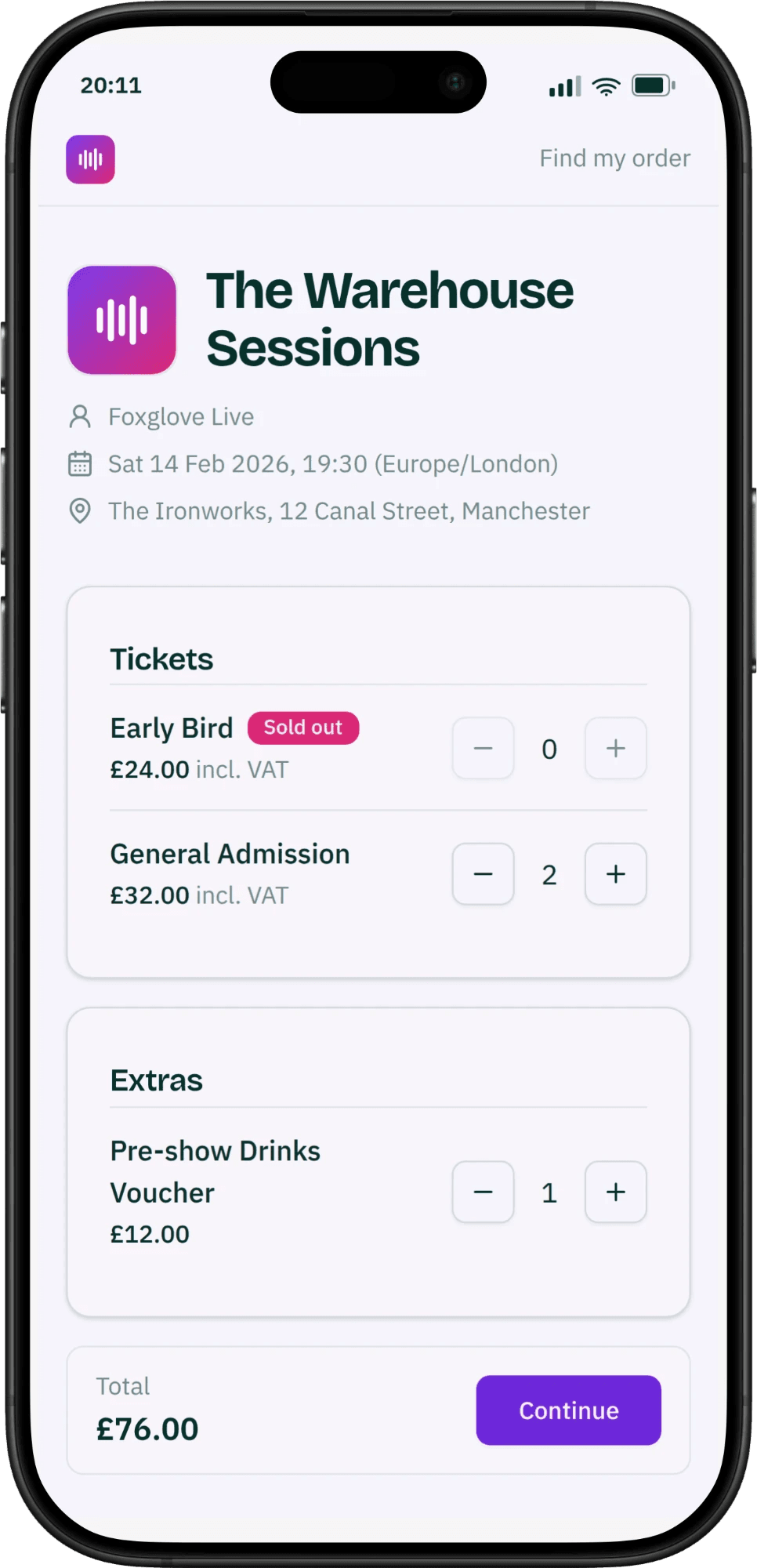
Free registration and paid ticket sales side by side, on hosted event pages that anyone can buy from without an account — with inventory that cannot oversell, whatever the rush.
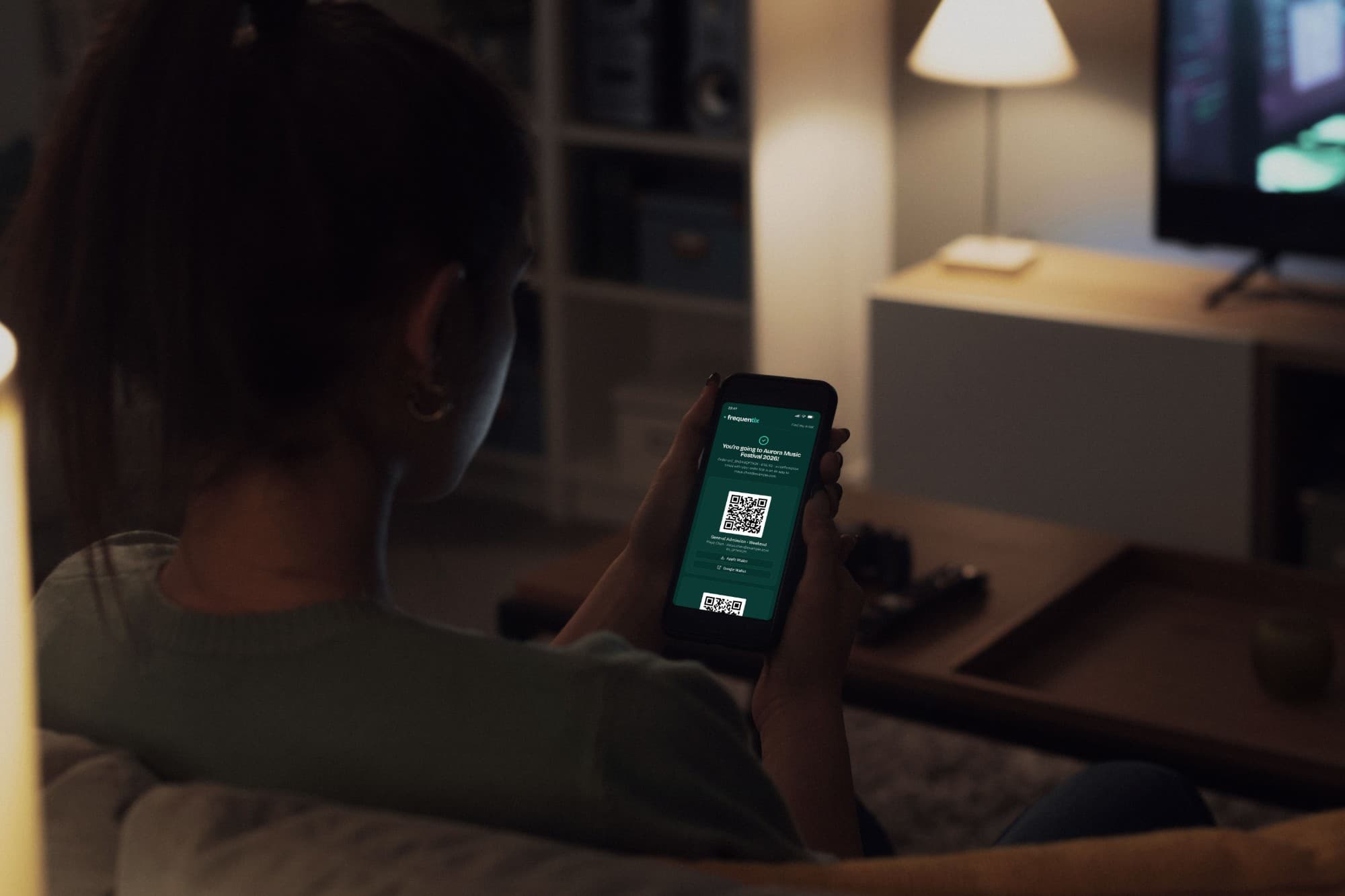
Events & ticket types
Create events with their own currency and timezone, keep them as a draft, then publish. Offer as many ticket types as you like, each with its own price, tax treatment and scan rules.
Run it online
Flag an event as online and buyers see “Online event” in place of a venue. Your joining link stays private — it rides the confirmation email and every reminder, never the public page — and you can publish before the room is booked and add the link when it exists. On every plan.
Scheduled on-sale & early-bird pricing
Put each ticket type on sale from a date and close it on another — no more manual publish and unpublish. Run early-bird → standard price ladders that switch automatically by date or once a set number have sold, and choose whether an off-sale ticket shows a countdown or stays hidden.
Pay what you want
Let buyers name their own price on any ticket type. You set the amount you suggest — prefilled at checkout — and, if you want one, a floor beneath which nobody may go. Leave the floor unset and “including nothing” is a valid answer, which is exactly the ask for a community venue. On Starter and above.
Oversell-proof inventory
Baskets hold stock for 15 minutes and release it if abandoned, so two people can never buy the last ticket — however hard the rush. Show “only a few left” urgency without leaking your sales totals.
Event-wide capacity
Cap the whole event as well as each ticket type, so a room that holds 200 sells 200 no matter how the mix falls between early bird, standard and on the door. Add-ons never eat into the venue’s count.
Waitlists with automatic release
When a ticket type sells out, buyers join a waitlist instead of hitting a dead end. A freed spot — an abandoned checkout, a refund, or you raising the cap — goes to the next person in line, held just for them with a time-limited claim link. Automatic on Pro, manual on Starter.
Add-ons & discounts
Sell parking, merchandise and extras with their own inventory. Create discount codes with validity windows, total and per-contact limits, validated live and redeemed safely even if two buyers reach for the last one at once.
Complimentary tickets
Invite someone by name — press, crew, a sponsor's guests — and their tickets issue at no charge, whatever the ticket normally costs. They get the same confirmation email and QR as any buyer, comps count at the door but never in your sales figures, and the guest list types you keep hidden from the storefront are exactly the ones you can comp. From the console or at the door, on every plan.
Access codes & hidden tickets
Keep a ticket type off the public page and hand out a code that reveals it — for members, press, friends and family. Codes are shareable, survive a refresh, and can carry a total use limit and a validity window. Deactivating one pauses it without un-hiding anything. On every plan.
Guest checkout, no accounts
Buyers purchase as guests — every order is secured by a private link we email, not a password. Lose the email? “Find my order” sends it again, so nobody is locked out of their own tickets.
Duplicate an event
Set up next month’s show in one action: ticket types, questions, discounts, seating, tax rates and branding copied into a fresh draft with new dates, and your choice of what to carry over. Sales history stays where it belongs — on the original.
One event, every date you run it
A theatre run, a weekly class, a visitor attraction selling entry every fifteen minutes — all one event with many dates, rather than a folder full of near-identical clones. On Starter and above.
Learn moreRuns, series & repeat dates
Turn one event into the nights of a show, the weeks of a course or the days of a fair. Buyers choose their date on the event page and can put more than one in the same basket. Starter runs up to 60 dates per event; Pro goes to 2,000.
Stock and sales per date
Capacity, sales counts and per-order maximums are all counted per date, so Friday selling out never touches Saturday. Your ticket types, questions, discounts and branding are configured once and apply to the whole run.
Timed-entry slot grids
Generate a grid of timed slots — every fifteen minutes, all day, for a season — from a single recurrence, with a per-slot cap and an admission window either side. On Pro and above.
Waitlists per date
A sold-out Saturday has its own queue. Buyers waitlist the date they actually want, and a freed place is offered to the people waiting for that date rather than to the event at large.
Cancel a single date
Call off one night without touching the rest of the run: sales stop, holds and seats are released, tickets already sold stay valid, and every holder is emailed once. Refunds stay a separate decision you take when you’re ready — cancelling a date never moves money by itself.
Seats and scans per date
Reserved seating works per date, so the same seat sells on twelve different nights. The scanner knows which night a ticket is for and turns away the right one at the wrong door — offline as well as on.
Sell the seat, not just the ticket
Design a seat map for your venue once and reuse it across every event. Buyers pick exactly where they sit, and the seat travels with them all the way to the door. Available on Pro and above.
Learn moreReusable venue seat maps
Lay out your venue in sections, rows and tables — stalls, circle, boxes, banquet rounds — and save it as a reusable map you drop onto any event, so you never draw the same room twice.
Per-seat pricing with categories
Group seats into categories — front stalls, side, restricted view — and map each to a ticket type, so a seat’s price, tax and scan rules come straight from the ticket it sells.
Buyers choose their own seats
A live seating chart lets buyers see what’s free and pick exactly where they sit, held for them by the same never-oversold inventory as everything else.
Seats on every ticket
Each seat label — “Stalls · Row A · Seat 4” — flows onto the ticket, the Apple & Google wallet pass and the scanner verdict, so the door can send everyone straight to their spot.
Accessible seats, chosen without a mouse
Mark accessible seats and choose how they release — freely bookable, bookable after an acknowledgement, or held for your staff to assign. A buyer using a keyboard or a screen reader gets a route to the same seats as the chart, driven by the same selection rules, so a seated event is one they can actually buy into.
Know who’s coming before they arrive
Ask the questions you need answered, vet who gets in, and let sponsors and exhibitors issue their own team’s tickets — all before anyone reaches the door.
Learn moreCustom registration wizard
Ask exactly what you need to know: a multi-step registration form with questions per ticket type, and follow-up questions that appear only when an answer calls for them. Nobody can finish checkout with a required answer missing.
Approval-gated tickets
Mark any ticket type as “requires approval” and buyers apply rather than buy — ideal for guest lists, press passes and member-only events. Review each request in a queue with the details they gave, then approve or decline individually or in bulk. Money only moves once you’ve said yes. On Pro and above.
Company & exhibitor ticket management
Record your sponsors, partners and exhibitors once and assign them to any event. Each gets a private link to manage its own team’s tickets — in bulk from a spreadsheet or one person at a time, restricted to the ticket types you allow — with a searchable roster to show each pass or reassign it when someone can’t come. A second link shows every ticket they hold across your events. On Pro and above.
Per-attendee assignment
Name each attendee at checkout and reassign a ticket to someone else later — it is re-issued and re-emailed automatically. Confirmation emails go out the moment an order is paid or a free order confirmed.
Per-buyer purchase limits
Cap how many tickets one person may buy across every order they place, not just per basket — so nobody clears your allocation four tickets at a time. Counted against the buyer, and enforced at the door as well as online. On Pro and above.
Payments that put you in control
Ticket sales run on Stripe Connect direct charges, so money lands in your own Stripe account and you stay the merchant of record.
Learn moreDirect-charge payments
Connect your Stripe account in minutes with Express onboarding. Card payments settle straight to your balance; frequentix only ever takes a transparent application fee.
You choose who pays the fee
Absorb the platform fee yourself, or add it to the buyer's total as a small service fee at checkout — the booking fee buyers already pay almost everywhere. Switch any time in Settings → Billing, on every plan; either way ticket revenue settles to your own Stripe account.
Multi-currency, exact money
Every price is held to the exact penny in its own currency, so money is never rounded wrong. Each event can run in its own currency.
Pay by invoice
A company wants to book ten passes and pay on invoice? Send them a payment request with your bank details, and their tickets are held while the transfer clears — mark it paid when the money lands, and the invoice, tickets and confirmation follow on their own. If it never arrives, the order cancels itself and the seats go back on sale. On Pro and above.
Refunds & fee control
Issue full or partial refunds; a full refund automatically voids the attendee’s tickets. Choose whether platform fees are proportionally reversed. Chargebacks are settled in your own Stripe dashboard — you are the merchant of record — and on Pro and above a charge.disputed webhook can push them into your own systems.
Tax & VAT handling
Add inclusive or exclusive tax per event, capture VAT numbers, and show a clear tax line on orders and receipts.
Donations at checkout
Ask for a donation alongside the ticket, or let people give without buying one at all. You choose the amounts you suggest and the minimum you accept. Available on every plan — and for a verified charity, the platform fee never touches the donation.
Gift Aid on donations
Verified UK charities can collect a Gift Aid declaration at checkout on sterling donations, then download the claim from Settings → Billing as an HMRC schedule to upload to Charities Online. Orders carrying a refund are excluded automatically.
Payouts & earnings in one place
See what you've earned — gross, fees, refunds and net, currency by currency — beside every payout Stripe has sent to your bank and the day it arrives. Download a statement for any payout that matches each bank line to the orders behind it, ready for your accountant. Your money still settles straight into your own Stripe account; frequentix never holds it.
The ticket has a life after checkout
Plans change. Buyers pass tickets on, move them to another night of a run, sell them back at face value, cancel to a policy you set — and every one of them gets a document that stands up to an accountant.
Learn moreTicket transfers
A holder passes a ticket to a named recipient, who accepts it from an emailed link. Ownership genuinely moves: the old QR is revoked everywhere — offline scanners included — and a fresh ticket is issued under the recipient’s own order, with their own wallet passes. You set the policy and the cutoff, and can see or cancel any transfer. On Starter and above.
Face-value resale
Someone who can’t come lists their ticket at exactly what they paid, and it is offered to your sold-out waitlist in turn. The buyer pays face value plus the usual booking fee, the seller is refunded face value, and the QR rotates on the way through. No touting, no markup, no marketplace taking a cut of your event. On Pro and above.
Swap to another date
On a multi-date run, a buyer holding Friday moves their ticket to Saturday from their order page — same ticket type, nothing to pay. The old QR stops working, a fresh ticket is issued for the new night, wallet passes update, the freed place is offered to Friday’s waitlist, and on a seated house they choose their seat on the new night. Your revenue per night follows the ticket. Staff can move any ticket from the console too — the answer when you have to cancel a night. On Starter and above.
Buyers cancel their own tickets
Turn it on per event and set the terms: how long before the date a buyer may cancel, a cool-off window after purchase, and a cancellation fee if you want one. They cancel individual tickets from the order page, the money goes back to the card, the place returns to your waitlist, and nobody has to email you. On Starter and above.
VAT invoices & credit notes
Every confirmed order gets a numbered, immutable document — a full VAT invoice where you’re VAT-registered, a plain receipt where you’re not. Numbering is gapless per organiser and resets each year; a refund raises a credit note that reproduces the original VAT exactly. Nothing is ever edited after issue: corrections cancel and reissue. Invoices on Starter and above; receipts on every plan.
An invoice a screen reader can read
To a screen reader, most platforms’ PDF invoices are a wall of unlabelled text. Yours is a real table on the order page that a screen reader can walk through — the wording as well as the figures — held to the same accessibility standard as the rest of the buy flow.
Buyers help themselves
From one private link a buyer can re-read their tickets, add them to Apple or Google Wallet, rename an attendee, download an invoice, transfer, change date, resell or cancel — and “find my order” re-sends the link to anyone who lost the email. Every one of those is a support message you never receive.
Check people in, online or off
Turn any phone or tablet into a scanner, print badges, and issue wallet passes — with check-in that keeps working when the venue Wi-Fi doesn’t.
Learn moreQR check-in with clear verdicts
Scan attendees in with unambiguous allow/deny reasons. Configure scan-once or scan-many, validity windows, and entry points that only admit the right ticket types.
Offline scanning
Devices keep admitting attendees with no connectivity and reconcile when back online. Refunded and cancelled tickets are still caught at the door, and no attendee data is ever stored on the device. On every plan.
Credential-free pairing
Pair a door device by scanning a QR or entering a short rotating code — devices never hold logins. Each device is pinned to one event and lane, and can be revoked instantly if it’s lost.
Search by name, check in without a QR
Someone has a flat battery or never opened the email. Type two letters of their name on the scanning device, find them, and check them in — the verdict and the record are exactly what a camera scan would have produced. The device never stores your attendee list, so a lost phone gives nothing away. On every plan.
Entry points & scan lanes
Define the gates and lanes of your venue and say which ticket types each one admits — VIP at the side door, general admission at the front. Every device is pinned to a lane, and every scan is recorded against it so you can see where your queues actually formed.
Printable badges
Design badges with positioned elements — name, company, ticket type and an embedded QR — and render them print-ready as PDF or PNG, in standard or custom sizes.
Apple & Google wallet passes
Issue attendees a signed pass for Apple or Google Wallet straight from checkout, and update passes when a ticket is reassigned, refunded or erased. A whole order’s passes — tickets and redeemable add-ons alike — add in one action.
Exhibitor lead capture
Sell your exhibitors lead capture at your own price, as an add-on they buy from their existing company link. Each licence pairs a phone by QR — no logins to hand out — and their team scans visitor badges to collect names, emails and notes, offline if the hall Wi-Fi gives up. Set your own qualifying questions for every stand to ask, and read the answers alongside a dashboard showing which exhibitors are equipped, how much they captured, and who was scanned by whom. On Pro and above.
Box office at the door
Sell walk-ups from the same device that scans: a door catalogue you curate separately from the storefront, Tap to Pay on iPhone or Android, cash, free issue, and a payment link the buyer settles on their own phone — with the sale checked in the moment it’s made. On every plan, including Free — on the App Store and Google Play.
Cash refunds and a drawer for every till
Hand cash back and record it in one step — the tickets cancel, the seats go back on sale, and your reports stay honest. At the end of the night, a cash-up per device says what should be in each drawer: takings by payment method with refunds already netted out, per date on a run. On every plan.
One view of every attendee
A contacts book that spans all your events, email campaigns and transactional email you can measure, bulk import and export, and reporting that ties revenue to attendance.
Learn more
Contacts CRM
A per-organiser address book keyed by email, so a person’s whole history lives in one place. Re-registering the same email updates the existing record instead of creating duplicates.
Email campaigns
On Pro and above, broadcast a branded email to everyone holding a ticket, or narrow it to specific ticket types. Compose in a rich editor with inline images, preview exactly how it lands in the inbox, then send now or schedule it for the moment you choose — with delivery and open-rate metrics, inside a generous monthly send allowance.
Automated email journeys
On Pro and above, set event reminders once — a week before, the day before, hours before doors — and every ticket-holder is emailed at the right moment, per date on a run, without counting against your send allowance. Switch on abandoned-checkout recovery and a buyer who drifted mid-purchase gets one nudge with a link that resumes their basket.
Transactional email
Order confirmations and buyers’ private order links go out reliably through Amazon SES on every plan, with delivery, bounce and complaint reconciliation, open tracking, and per-event and per-message metrics.
CSV import & export
Issue tickets in bulk from a CSV, matching or creating contacts by email, with per-row progress and safe retries that never import twice — and export your tickets, orders and contacts back out to CSV whenever you need them.
Sales & attendance reports
Per-event revenue broken into subtotal, discount, tax, gross, fee and net, plus refunds and tickets by type — alongside scans by result and location.
Marketing attribution
Tag your share links with UTM parameters and see, per event, which sources turned views into checkouts and paid conversions — first-party, with no third-party pixels.
Automate with the API & webhooks
Connect frequentix to the tools you already run. On Pro, a scoped developer API reads your events, orders, tickets and contacts and writes what automations need — contact sync, check-ins, webhook subscriptions — with instant, signed webhooks for every lifecycle event. An official Zapier app is on its way, built on the same developer API.
Your brand, your team, your terms
Brand every touchpoint, invite your team with precise permissions, and run as many organiser accounts as you need — in any language and currency.
Branding & white-label
Add a custom logo per event, and remove frequentix branding entirely on higher plans for a fully white-labelled buyer experience.
Your own words on the storefront
Write the fixed text slots yourself — the event-page introduction, a note at checkout, the confirmation message, door instructions and the registration intro — set once for your account and overridden per event where it matters. Authored per language, so a French buyer reads French. On Starter and above.
Custom transactional email copy
Override the subject, opening and closing of every automatic email frequentix sends on your behalf — confirmations, order links, waitlist offers, cancellations — per language, without giving up the delivery machinery behind them. On Pro and above.
Teams & granular roles
Invite staff and give each person exactly the access their job needs — build roles from fine-grained permissions, and limit a member to specific events. The box office volunteer sees the door; the accountant sees the money; nobody sees more.
Run more than one organisation
A venue and its festival, an agency and its clients — one login, any number of organisations, and each one’s data entirely its own. No other account can ever see it. Switching takes a single action.
Multi-currency, many languages
Charge in any currency, held to the exact penny per event. The storefront and buyer emails speak five languages, matched to each buyer’s browser — and you choose the language an event leads with.
A storefront that sells for you
Your hosted event pages don’t just take payment — they help buyers find your event, book in their own language, and add it straight to their calendar.
Learn moreYour own event page
One link that lists everything you have on sale, under your branding — a filterable list and a month view of every published date. Share it once instead of a link per event, and every event page on it is one a search engine can then find. Set your handle in the console and the page is live; clear it and it is gone.
Sell in five languages
Your storefront and every buyer email speak the buyer’s language — English, French, German, Spanish or Dutch. Each language gets its own URL and hreflang, a switcher lets buyers change it, and order confirmations arrive localised with the right dates and currency.
Add to calendar & share
Every event and order page offers one-tap add-to-calendar for Apple, Google and Outlook — a proper .ics file — plus sharing to X, Facebook, WhatsApp and LinkedIn. Attendees lock in the date and spread the word, and the confirmation email carries an add-to-calendar link too.
Found on Google
Every event page ships schema.org event structured data, so it can surface as a rich Google event result, plus Open Graph and Twitter cards so shared links unfurl with a proper title and image instead of a bare URL.
Sell on your own site
Drop one snippet onto your own website and the full frequentix checkout — ticket picker, registration, Stripe payment and wallet passes — runs right there on your page, so buyers never leave your brand. Pick an inline widget or a pop-up button, choose which domains may embed, and go live on Pro and above.
Accessible by default
The buy flow targets WCAG 2.2 AA, and we test for it on every change — the whole purchase journey, on desktop and phone, including choosing a reserved seat with only a keyboard. A buyer who cannot use a mouse can still buy a ticket, and still pick their own seat.
Sell the whole night, not just the ticket
Grow revenue beyond the single ticket by combining what you already sell into deals buyers can price at a glance — on the same event page, with the same oversell-proof inventory.
Learn moreTicket & extras bundles
Sell a set at one price — a table of eight, a ticket-and-shirt deal, a weekend plus camping. The event page shows what the bundle contains and what it saves against buying the pieces separately; stock binds to the bundle's own cap and every component's; and each item inside is issued, scanned, transferred and refunded exactly as if bought on its own. On Starter and above.
Season tickets
Sell a whole run as one ticket: a theatre season, a festival weekend, an attraction's annual pass. One QR, valid on every date, admitted once per date at the door — online and offline — with each night's entries counted in that night's attendance. No reissues, no per-date juggling. On Starter and above with multi-date runs.
Gift cards
Sell your own gift cards at checkout and straight from your public organiser page — a value the buyer picks, a personal message, and delivery to the recipient by email on the day they choose, with a designed card to download. Redeemed against any of your events as part payment or the whole ticket, with every balance movement on an auditable ledger and refunds restoring the card first. Cards never expire unless you set a term. On Starter and above.
Cross-event season passes
Sell one pass that covers a whole season of separate events — every home game, a year of shows. Buyers check out once and get real tickets for every covered event, in their wallet and valid at each door the moment they pay, with each event's own stock counted so a full house is never oversold. Add an event to the season later and every pass holder receives its tickets automatically. On Pro and above.
Memberships
Sell annual or fixed-term memberships with benefits that work at checkout: members-only tickets, a member discount, early access before the public on-sale, and included ticket credits to spend on entry. Members verify with the link in their welcome email — no buyer accounts to run — check their benefits and credits on their own membership page, and renew from there in a couple of clicks. On Pro and above.
Secure, and private by default
Attendee data is protected at every step — encrypted ticket codes, one-action GDPR erasure, audit logging, tightly scoped access, and multi-factor sign-in for your team.
Encrypted ticket codes
Ticket QR codes are encrypted with a key unique to each event, so a scan reveals nothing without it. Each event’s key is itself encrypted at rest.
GDPR erasure
One action anonymises a contact, voids their tickets, invalidates their wallet passes and records the erasure in the audit log.
Audit logging & rate limiting
Actions that touch money, access, personal data or the setup of your events are recorded to an audit trail — who did it, when, and what changed — and every sensitive endpoint is throttled against abuse.
Split authentication
First-party staff and scanner tokens are kept separate from third-party OAuth clients, each with tightly scoped abilities and public identifiers that give nothing away.
Multi-factor authentication
Reaching anything sensitive — attendee data, exports, billing — requires a second factor: email one-time codes or an authenticator app, backed by single-use recovery codes and replay protection.
Sign in with Google
Your team can sign in with Google, so account access rides on Google’s own protections and second factor.
See it working on your own events
Create an organiser account and publish your first event for free — you only pay a per-ticket fee when you make a sale.